说明:双击或选中下面任意单词,将显示该词的音标、读音、翻译等;选中中文或多个词,将显示翻译。
您的位置:首页 -> 词典 -> 实用翻译教程
1)  An Appled Theory of Translation
实用翻译教程
1.
In this paper the author discusses and analyses in detail the unalternation of word structure, the translated version and especially the revised translation included in Fan Zhongying s An Appled Theory of Translation , and also puts forward his own views on them.
笔者对《实用翻译教程》一书中的部分观点 (用词结构不得更改一说 )和译文特别是改译等提出了商榷 ,并举例予以分析。
2)  practical translation
实用翻译
1.
Nowadays,practical translation booms with the economic development and social progress in China.
随着我国的经济发展和社会进步,实用翻译任务面广量大。
3)  pragmatic translation
实用翻译
1.
The paper states the important role of Skopostheorie in pragmatic translation,addressing the topic that the prime principle determining any translation process is the purpose(Skopos) of the overall translational action.
诺德(Christiane Nord)等学者提出的目的功能论为指导,认为在实用翻译中,首要考虑的是译文的预期功能,由此确定翻译策略,不仅要忠实地译出原文内容,并且要保证其在译语环境中存在意义,作出正确的表达,达到交际的目的。
4)  pragmatic text translation
实用文本翻译
1.
Contrary to those of traditional translation,the paper tries to argue for linguistic peculiarities,purpose-orientation,information unit,communication concept as characteristics of pragmatic text translation,with the view that target readers be the first to be served.
从语言性质、目的性、信息单位、交际观四个方面来阐述实用文本与传统翻译观的不同特点,用以说明实用文本翻译是以读者为中心的翻译活动。
5)  general English translation
实用英语翻译
6)  Practical Translation Aesthetics
实用翻译美学
1.
The Analyses of China English Using Practical Translation Aesthetics;
从实用翻译美学审美中国英语
补充资料:mastercam实用技术教程二

mastercam实用技术教程4
2. 选择Boundaries设置工件毛坯。见图9-7对话框。

(1) 通过Stock项目设置工件毛坯大小。选择Parameters→Take from 2 point设置毛坯的左下角点为(-100,-310),右上角点为(100,10),生成虚线如图9-8所示的毛坯。
(2) 通过Tailstock尾座顶尖的参数。
(3) 通过Chuck设置卡盘的参数。
(4) 通过Steady rest设置辅助支撑的参数。

(5) 选择Ok,工件设置完成。
(二) 生成车端面刀具路径
1. Main Menu→Toolpaths→Face系统弹出如图9-9所示的对话框。
2.在Tool parameters参数对话框中选择刀具,并设置其他参数。
3.选择对话框中的Face parameters标签,并设置参数。见图9-10所示。Face parameters选项中各参数的含义如下:
(1)Entry amount
Entry amount输入框用于输入刀具开始进刀时距工件表面的距离
(2)Roughstepover
当选中Roughstepover输入框前面的复选框时,按该输入框设置的进刀量生成端面车削粗车刀具路径。
(3)Finish stepover
当选中Fini9hstepover输入框前面的复选框时,按该输入框设置的进刀量生成端面车削精车刀具路径。

(4)Number of finish
设置端面车削精车加工的次数。
(5)Overcut amount
该输入框用于输入在生成刀具路径时,实际车削区域超出由矩形定义的加工区域的距离。
(6)Retract amount
该输入框用于输入退刀量,当选中Rapid retract复选框时快速退刀。

(7)Stock to leave
该输入框用于输入加工后的预留量。
(8)Cut away from center
当选中该复选框时,从距工件旋转轴较近的位置开始向外加工,否则从外向内加工,
4.选择Select Point,确定加工区域。
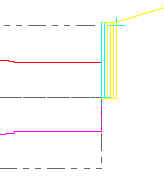
5.选择Ok,退出Face参数设置。生成如图图9-11所示的刀具路径。

二、生成轮廓粗车加工刀具路径
接着前面的例子介绍轮廓粗车加工刀具路径的生成。
1. Main Menu→Toolpaths→Rough→Chain。选取所加工的外圆柱表面,如图9-12所示。然后选择Done。

说明:补充资料仅用于学习参考,请勿用于其它任何用途。
参考词条