1) curve with small radius
小曲线
1.
Described are the usage, technical features and the main structure, parameters and operation of the special flat car for transport of hot steel billets of one hundred tons on the curve with small radius.
介绍了小曲线热钢坯运输专用平车的用途、技术特点及车辆的主要结构、参数和运用情况。
2) Curve with small radius
小曲线半径
3) minimum curve radius
最小曲线半径
1.
This article discusses the feasibility of inter-city passenger-dedicated railways to share common tracks with urban rail transit from two aspects: the process of determining the minimum curve radius of railways and business organization.
从最小曲线半径的确定过程和运营组织两方面,对城际客运专线进入市区后能否与城市轨道共轨做了初步探讨。
2.
An emulation computation and analysis was made by track coupled dynamics theory of the dynamic performance of trains passing through high speed and medium speed mixed passenger railways and high speed passenger and low speed freight mixed railways, providing technical support for determining minimum curve radius standard.
运用车辆轨道耦合动力学理论分别对列车动态通过高中速客车共线与高低速客货混跑的曲线轨道进行动力学性能指标的仿真计算、分析与评价 ,可作为论证制定最小曲线半径标准技术可行、经济合理的有力支
4) minimum radius
(道路) 最小曲线半径
5) Xiaoqu
小曲
1.
Study on the Effects of Polygonum hydropiper,Mulberry Leaf and Polygonum multiflorum thunb leaf on Xiaoqu Quality;
辣蓼草、桑叶及何首乌对小曲质量的影响
2.
Effect of the Production of Xiaoqu Using Daqu Distiller's Grain as a Substitute for Rice Bran;
大曲丢糟代替米糠生产小曲的效果研究
3.
Study on the Effects of Polygonum hydropiper on Xiaoqu Quality;
辣蓼草对小曲质量的影响研究
6) Qu
小曲
1.
Comparison of Guangxi Quanzhou Qu and Hunan Pingjiang Qu;
广西全州小曲与湖南平江小曲的比较研究
2.
Effect of polygonum multiflorum thunb leaf on the quality of Qu;
何首乌叶对小曲质量的影响研究
参考词条
补充资料:Autocad VBA初级教程 (第五课 画函数曲线)
先画一组下图抛物线。
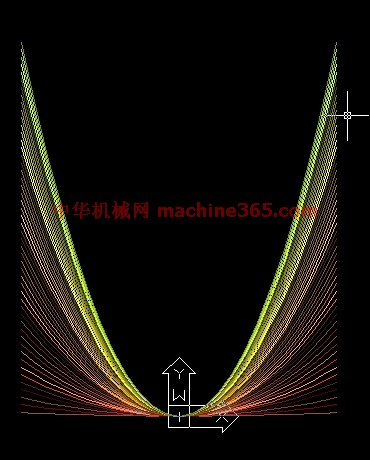
下面是源码:
Sub myl()
Dim p(0 To 49) As Double '定义点坐标
Dim myl As Object '定义引用曲线对象变量
co = 15 '定义颜色
For a = 0.01 To 1 Step 0.02 '开始循环画抛物线
For i = -24 To 24 Step 2 '开始画多段线
j = i + 24 '确定数组元素
p(j) = i '横坐标
p(j + 1) = a * p(j) * p(j) / 10 '纵坐标
Next i '至此p(0)-p(40)所有元素已定义,结束循环
Set myl = ThisDrawing.ModelSpace.AddLightWeightPolyline(p) '画多段线
myl.Color = co '设置颜色属性
co = co + 1 '改变颜色,供下次定义曲线颜色
Next a
End sub
为了鼓励大家积极思考,从本课开始,我不再解释每一条语句的作用,只对以前没有提过的语句进行一些解释,也许你一时很难明白,建议用上一课提到的跟踪变量、添加断点的办法领悟每一条语句的作用,如果有问题不懂请跟贴提问。
在跟踪变量p时请在跟踪窗口中单击变量p前的+号,这样可以看清数组p中每一个元素的变化。
ACAD没有现成的画抛物线命令,我们只能用程序编写多段线画近似抛物线。理论上,抛物线的X值可以是无限小、无限大,这里取值范围在正负24之间。
程序第二行:Dim myl As Object '定义引用曲线对象变量
Object也是一种变量类型,它可以把变量定义为对象,本例中myl变量将引用多段线,所以要定义为Objet类型。
看画多段线命令:
Set myl = ThisDrawing.ModelSpace.AddLightWeightPolyline(p) '画多段线
其中括号中的p是一个数组,这个数组的元素数必须是偶数,每两个元数作为一个点坐标。
等号前面部分“Set myl”的作用就将myl变量去引用画好的多段线。
myl.Color = co '设置颜色属性。在ACAD中,颜色可以用数字表示,本例中co会增值,这样就会有五彩缤纷的效果。
本课第二张图:正弦曲线,下面是源码:
Sub sinl()
Dim p(0 To 719) As Double '定义点坐标
For i = 0 To 718 Step 2 '开始画多段线
p(i) = i * 2 * 3.1415926535897 / 360 '横坐标
p(i + 1) = 2 * Sin(p(i)) '纵坐标
Next i
ThisDrawing.ModelSpace.AddLightWeightPolyline (p) '画多段线
ZoomExtents '显示整个图形
End Sub
说明:补充资料仅用于学习参考,请勿用于其它任何用途。