1) engineering coordinates

工程坐标
2) engineering coordinate system
工程坐标系
1.
This paper introduces methods of coordinate transform form WGS-84 to engineering coordinate system and its application
本文结合实时差分(RealTimeDifference)GPS定位技术在某海港航道疏浚工程中的应用,介绍了GPS导航定位测量中WGS-84坐标与工程坐标系的转换方法及应用。
2.
5 cm/km,the local engineering control network should be established,this paper discusses the general method to establish engineering coordinate system,and the coordinate transformation among different engineering coordinate systems,and the transformation between the engineering coordinate system and Beijing geodetic coordinate system 1954,and verified by through an example.
5 cm/km时应建立地方工程控制网的要求,讨论了工程坐标系统建立的一般方法,以及不同工程坐标系间的坐标转换、工程坐标系与国家1954年北京坐标系间的坐标换算,并通过实例进行了验证。
3) engineering horizontal coordinate
工程平面坐标
4) project independent coordinate system
工程独立坐标系
1.
Method study on the establishment of project independent coordinate system
工程独立坐标系的建立方法研究
5) programming coordinates
编程坐标
6) Coordinate Equation
坐标方程
1.
By using the theoretical analysis,a transformations matrix and its coordinate equations are derived.
用画法几何的投影理论分析推导出透视投影的变换矩阵及坐标方程,使各参数的几何意义一目了然。
补充资料:工程图标准尺寸及坐标尺寸
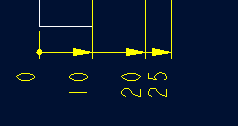
标准标注类型,是我们常用的标注类型。而坐标标注是便于数控加工采用的另一中标注形式。PRO/E可以将两种标注方式进行转换。
· 3.2 标准标注到坐标标注的转换
注意: 转化为坐标标注的尺寸必须是线性标注的,下列尺寸不能转化为坐标标注:
- 被显示成线性尺寸的直径
- 中心线尺寸
- 选择MODIFY DRAW > Dim Params > Dim Type > Ordinate Dim > Create Base.
- 选择作为参考基准线的尺寸
- 选择基准的引出线,该点为0点
- 选择 MOD DIM TYPE > Lin to Ord .
- 选择线性尺寸:注意:必须选择具有相同基准的尺寸
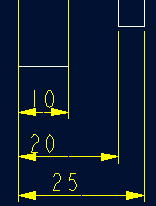 ========>>>>
1. 选择 DIM PARAMS > Diam Dim Type .
2.点击Ord to Lin 
3.选择尺寸即可
说明:补充资料仅用于学习参考,请勿用于其它任何用途。
参考词条