2) culture
文化
1.
Science and Technology Change Lives,Culture Directs Trends On Cultural factors of Television Cabinet evolution;
科技改变生活 文化领导潮流——家居电视柜变迁的文化基因
2.
The influence of economy and culture during the Tang Dynasty on clothing style;
探讨唐代经济文化对服饰的影响
3) civilization
文化
1.
The development of Chinese classical architecture is not only inflnenced by station, climate and natural resources, but also by the Chinese civilization.
中国古建筑采用木构体系,除地理、气候、资源等原因外,还受到中国文化的深刻影响,并在中国文化稳定性的影响下得以延续发展,中国文化的兴衰决定了木构建筑的兴衰。
2.
Based on the needs of the city construction and spirit lives, a notion of new civilization square is proposed in this paper, and it improves a long range development space civilization of human city.
根据城市建设及精神生活的需要,提出新型的文化空间的概念,促使人类城市空间文化持续性发展。
3.
Buddhism is a main composition in ancient civilization of China, bamboo is also major symboliza-tion.
佛教是中国古代文化很重要的组成部分,竹子也是中国古代文明的一大象征。
4) cultural
文化
1.
Banana s Cultural Connotations and Its Application in Traditional Gardens;
芭蕉的文化意蕴及在传统园林中的应用
2.
Cultural Explication of the Uygur s Eating Nang Convention;
维吾尔族食馕习俗的文化解说
3.
University s Collar Play in Cultural Construction;
浅析大学在文化建设中的引领作用
5) The Culture
文化
1.
The intention of this study is to explore the color how to reflect the culture and how relationgship between culture and color.
某些颜色词除能表达所固定颜色意义外,还具有丰富的文化内涵。
2.
The culture of mirror image is a kind of characteristic content in the culture history of china.
镜象文化是中国文化史上一项独具个性的内容。
6) cultures
文化
1.
Silence is one of the most important parts of daily communication,yet it means otherwise in different cultures.
沉默是日常交际中重要的组成部分,然而不同文化中沉默具有不同的含义。
2.
This paper compares and analyzes the differences between English and Chinese cultures,which lead to the causes and representations of the discrepancy.
语言与文化关系密切,不同语言的表现形式反映了不同民族的文化特点。
参考词条
补充资料:将CAD图形导入Coreldraw的实用方法
我个人认为,理论上Coreldraw可以绘制复杂的工程图和电子图等,但它的长处不在这里 ,这也许是AutoCAD的拿手好戏。但若要在Coreldraw中制作图文并茂的文档,说明性的技术手册等,或者很多标注和填充图案的图形时,就要通过图形格式交换导入AutoCAD格式的文件。
经过个人的实践,初步找到了一种比较可行的方法。
在讲解此方法之前,首先要说明的是,理论上Coreldraw可以直接打开或导入*.DWG,
*.DXF等格式的文件,但我曾尝试过,效果不理想。就算是AutoCAD标准的图形交换格式文件(*.DXF文件),导入Coreldraw中效果也不是很好,很难保持AutoCAD文件的原貌,有时 甚至面目全非,如图1。这时你总不能用Coreldraw再一点点的描吧?如果转成位图格式导入,效果也不好,且文件体积太大。
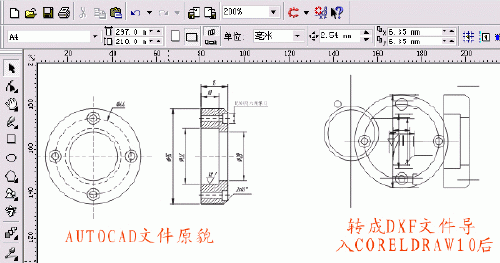
那么我们先来试试下面的方法。以AutoCAD R14和Coreldraw10为例,其基本思路是:
AutoCAD ->DWG文件->导出成WMF文件->导入到Coreldraw中->进一步处理,转换为可编辑的矢量图形文件,只要在Coreldraw中处理好一切,可以导出成AI,PS,EPS等格式,就可以方便再做印前、印刷方面的工作。好了,言归正传,先来看看这个比较“笨”但是很实用的一种方法吧。
1. 在AutoCAD R14中绘制好图形,选工具(Tools)->系统配置(Preferences)->显示(Display)->颜色(Color),将背景色变成白色(否则贴入的图会带纯黑色背景),单击“OK”,如图2。
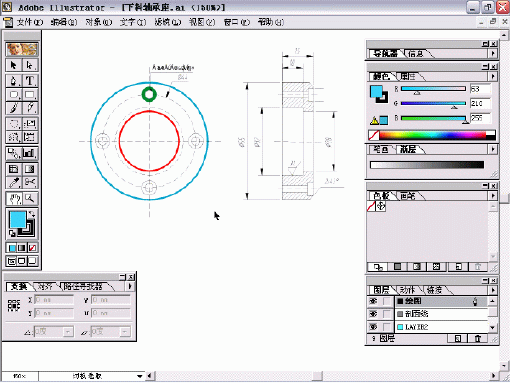
2. 回到绘图窗口,就会发现背景已经成为白色。
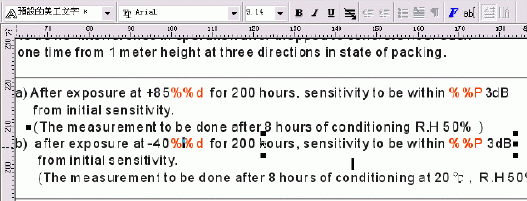
3. 为了在AutoCAD中能够平滑且精确显示,还要输入命令Viewres,设置变量,将其数值调大,如10000。否则的话,不仅在CAD中显示不够精细光滑,导入Coreldraw中的图形会走样,常见的就是圆变成了多边形。如图3。在命令行中输入Pan(平移)->右键菜单中选“Zoom Eextens”,将图形放到尽量大。
4. 选择要输出的图形,从“文件”(File)菜单中选“输出(Export)”,选择输出为wmf文件格式,如图4所示。
5. 进入Coreldraw,新建一个文档。右击工作区,选“输入”(或者用快捷键Ctrl+I),从一大串支持的文件格式中选“Wmf格式”,选择刚才输出的Wmf文件,拉出一个对象框,导入。多少有点不幸,我们所需要的图形和一大块空白紧密结合,成为一体(我想这就是AutoCAD中的白色背景啦),白占了空间,而且编辑起来很不方便。如图5。(为了更加明显,图中用灰色突出表示)
说明:补充资料仅用于学习参考,请勿用于其它任何用途。