1) Hyper Cochrane sums

超级Cochrane和
2) Cochrane sums
Cochrane和
1.
Mean value of Cochrane sums over short intervals;
关于短区间上Cochrane和的均值
2.
By using the elementary method to study the arithmetical property of Cochrane sums,an interesting identity is given.
利用初等方法研究 Cochrane和的一个算术性质 ,给出一个有趣的恒等
3.
In this dissertation, the mean value of some famous summations including character sums over a short interval, two-term exponential sums with Dirichlet character, Cochrane sums, Kloosterman sums and their.
因而在这一领域取得任何实质性进展都将有可能对解析数论的发展起到重要的推动作用! 本文主要研究了数论中一些著名和式的均值估计问题,其中包括短区间上的特征和、带特征的二项指数和、Cochrane和、Kloosterman和以及它们的各种推广和式。
3) generalized Cochrane sum
广义Cochrane和
4) high-dimensional Cochrane sum
高维Cochrane和
1.
A mean value of the high-dimensional Cochrane sum
高维Cochrane和的一种均值估计
5) hyper-Kloosterman sums
超级Kloosterman和
1.
The main purpose of this paper is to study the hybrid mean value of E(q,k,c) and the hyper-Kloosterman sums K(h,k,q), and give an mteresting mean va.
本文的主要目的是利用Gauss和与原特征的性质,以及Dirichlet L-函数的均值定理,来研究E(q,k,c)与超级Kloosterman和K(h,k,q)的混合均值,并给出一个均值公式。
2.
The main purpose of this paper is using the properties of Gauss sums, primitive characters and the mean value theorems of Dirichlet L-function to study the hybrid mean value of the hyper Cochrane sums C(h,q;m, k) and the Hyper-Kloosterman sums Kl(h, k + 1,q), and give an interesting mean value formula.
本文利用Gauss和与原特征的性质以及DirichletL-函数的均值定理研究了超级Cochrane和与超级Kloosterman和的混合型均值,并给出了一个有趣的渐近公式。
6) superfine and nanometer powder
超细和纳米级粉末
补充资料:AutoCAD 超级填充用法
在使用超级填充前首先要确认你的ACAD已经安装了快捷工具
1、画好填充内容,做成块,本例的块名是“h1”
1、画好填充内容,做成块,本例的块名是“h1”
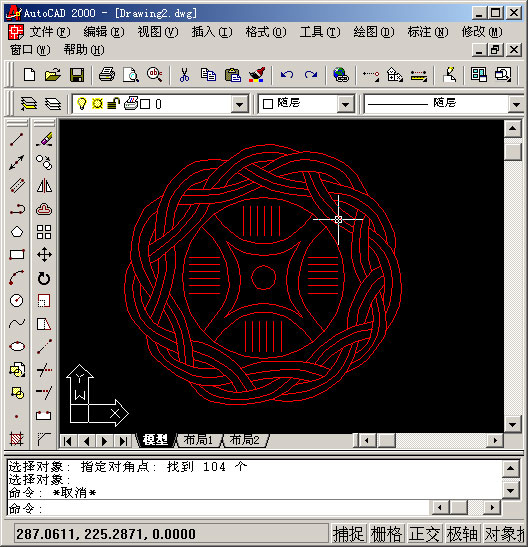
2、用superhatch,并根据实际情况选择填充参数


以下是我的命令行提示,除了比例需要自己输入,其他只要用鼠标点点就行
命令: superhatch
AutoCAD Express Tools Copyright ?1999 Autodesk, Inc.
正在初始化...
H1 指定插入点或 [比例(S)/X/Y/Z/旋转(R)/预览比例(PS)/PX/PY/PZ/预览旋转(PR)]:
输入 X 比例因子,指定对角点,或者 [角点(C)/XYZ] <1>: .1
输入 Y 比例因子或 <使用 X 比例因子>: .1
指定旋转角度 <0>:
命令:
接受该 BLOCK 的位置吗? [是(Y)/否(N)] <是>:
指定矩形的圆角半径 <0.0000>:
指定矩形的线宽 <0.0000>:
指定矩形的厚度 <0.0000>:
在 block 周围选择一个窗口来定义列和行的距离。
当前矩形模式: 宽度=0.8207
指定 block 的第一个角点 [范围(E)] <紫色矩形>:
当前矩形模式: 宽度=0.8207
指定矩形的圆角半径 <0.0000>:
指定矩形的线宽 <0.8207>:
指定矩形的厚度 <0.0000>:
正在选择用于边界检测的可见对象...完成。
说明:补充资料仅用于学习参考,请勿用于其它任何用途。
参考词条