1) Ajax
异步脚本传输
2) asynchronous
异步
1.
Application of asynchronous pattern PSO in QoS multicast routing;
异步粒子群优化算法在QoS组播路由中的应用
2.
Design Foundation of Function Module of Asynchronous System;
异步系统功能模块的设计基础
3.
Analyses of Asynchronous Mode in Winsock;
Winsock的异步模式探讨
3) asynchronization
异步
1.
The paper recounts the method that makes the sampler and A/D translator to synchronize returning to zero problem when thoroughfare of itinerant decting instrument is designed by core of the microcomputer so that the measuring values approach the reality value and don t lead into measuring error by the sampler and A/D translator asynchronization.
从而使装置测出的显示值接近真实值,而不会引起由于采样器与A/D转换器异步时产生的测量误差。
4) asynchronism
异步
1.
Synchronism and Asynchronism Based on BPEL;
BPEL中同步与异步机制
2.
Computer serial communication signal is compliant to asynchronism start/stop control protocol,however,the telephone sampling signal is periodic.
本文介绍了用FPGA实现异步信号与同步信号进行数字复接的一种方法。
3.
Distributed object technology is a good solution of software development and integration,but traditional invocation models based on distributed objects restrict the application of distributed object technology in high performance distributed computing due to the lack of asynchronism.
分布对象技术是分布异构环境下软件开发和系统集成的良好解决方案 ,然而在高性能分布计算领域 ,传统调用模型在异步特性方面的不足限制了分布对象技术在该领域的应用。
5) differential speed rolling
异步轧制
1.
Research on drawability of AZ31 magnesium alloy sheet processed by differential speed rolling at room temperature;
异步轧制AZ31镁合金板材室温冲压性能研究
2.
Microstructure of AZ31 magnesium alloy sheets processed by differential speed rolling;
异步轧制AZ31镁合金板材组织
3.
The objective of this study on microstructure and grain orientation of AZ31 magnesium alloy sheets produced by differential speed rolling was to investigate the possibility of improving deformability of AZ31 magnesium alloy sheets.
主要对异步轧制AZ31镁合金板材的显微组织和晶粒取向进行了研究,以探讨提高镁合金板材塑性变形能力的途径。
6) Asynchronous spectrum
异步光谱
参考词条
补充资料:AutoCAD脚本文件的创建和使用
1 脚本文件简介
脚本文件类似于DOS操作系统中的批处理文件,它可以将不同的AutoCAD命令组合起来,并按确定的顺序自动连续地执行。脚本文件是文本文件,扩展名为“.SCR”,用户可使用任一文本编辑器来创建脚本文件。
因为脚本文件可使一些命令序列自动执行,所以常用来产生、编辑或观看图形,如幻灯放映、初始的图形设置等。但脚本文件不能使用对话框或菜单,当从脚本文件中发出打开对话框命令时,AutoCAD运行该命令的命令栏含义而不是打开对话框。
用户可以通过命令行的开关设置,使AutoCAD在启动时自动调用脚本。此外,用户也可以在AutoCAD中运行脚本,其调用方式为:
菜单:【Tools(工具)】→【Run Script…(运行脚本)】
命令行:script(或别名scr)
注意 AutoCAD 的“undo”命令将每个脚本当作一个组,可以用单个“undo”命令放弃一组脚本的操作。
说明 “script”命令可透明地使用。
2 实例1 使用脚本文件绘制并显示图形
Step 1 创建脚本文件“exam_draw.scr”
(1) 使用Windows附件中的“记事本”程序创建一个新文件。
(2) 在该文件中添加如下内容,如图1所示。
脚本文件类似于DOS操作系统中的批处理文件,它可以将不同的AutoCAD命令组合起来,并按确定的顺序自动连续地执行。脚本文件是文本文件,扩展名为“.SCR”,用户可使用任一文本编辑器来创建脚本文件。
因为脚本文件可使一些命令序列自动执行,所以常用来产生、编辑或观看图形,如幻灯放映、初始的图形设置等。但脚本文件不能使用对话框或菜单,当从脚本文件中发出打开对话框命令时,AutoCAD运行该命令的命令栏含义而不是打开对话框。
用户可以通过命令行的开关设置,使AutoCAD在启动时自动调用脚本。此外,用户也可以在AutoCAD中运行脚本,其调用方式为:
菜单:【Tools(工具)】→【Run Script…(运行脚本)】
命令行:script(或别名scr)
注意 AutoCAD 的“undo”命令将每个脚本当作一个组,可以用单个“undo”命令放弃一组脚本的操作。
说明 “script”命令可透明地使用。
2 实例1 使用脚本文件绘制并显示图形
Step 1 创建脚本文件“exam_draw.scr”
(1) 使用Windows附件中的“记事本”程序创建一个新文件。
(2) 在该文件中添加如下内容,如图1所示。
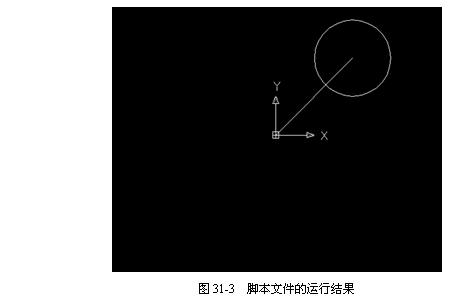
注意 其中调用“exam_view.scr”文件的路径应根据实际情况而定。
(3) 以“exam_draw.scr”为名保存该文件。
Step 2 创建脚本文件“exam_view.scr”
(1) 使用Windows附件中的“记事本”程序创建一个新文件。
(2) 在该文件中添加如下内容,如图2所示。
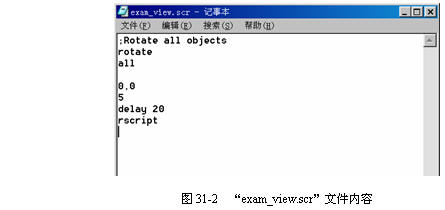
(3) 以“exam_view.scr”为名保存该文件。
说明:补充资料仅用于学习参考,请勿用于其它任何用途。