1) Auto CAD
《AutoCAD》
2) AutoCAD
AutoCAD
1.
Application of AutoCAD in mining geology;
AutoCAD在矿山地质中的应用
2.
A method for getting the coordinates of punch force center and total profile length of formed punch in AutoCAD;
一种在AutoCAD中求冷冲模压力中心和冲裁轮廓总长的方法
3.
Discussion of Method to Array Tubes in Heat Exchanger by Using AutoCAD;
用AutoCAD解决换热器布管问题初探
3) Auto CAD
AutoCAD
1.
Using the Template of Auto CAD to Optimmize the Drawing Environment;
合理利用AutoCAD初始样板,优化家具制图环境
2.
Analysis of the Usage of Auto CAD in the Course Design of House Architecture;
运用AutoCAD辅助《房屋建筑学》课程设计浅析
3.
Simple Talking about Auto CAD for Design of Cable Stayed Bridge Type;
浅谈斜拉桥桥型设计AutoCAD
4) AutoCAD 2000
AutoCAD 2000
1.
The Apple for Reactor in Design of Program of AutoCAD 2000 Visual LISP;
AutoCAD 2000 Visual LISP事件反应器编程技术
5) AutoCAD Rx
AutoCAD Rx
6) AutoCAD ActiveX
AutoCAD ActiveX
1.
CALCULATING THE SIZE OF PROCUT METAL BLANK BASED ON AutoCAD ActiveX TECHNOLOGY;
基于AutoCAD ActiveX技术计算旋转体拉伸件毛坯尺寸
2.
Based on AutoCAD ActiveX and VBA techniques and through carrying out the secondary development on AutoCAD2004,a kind of handy and easy to use automated generative system of parameterized drawing was built.
基于AutoCAD ActiveX和VBA技术,通过对AutoCAD 2004进行二次开发,搭建了一种简便易用的参数化图纸自动生成系统。
3.
Using The AutoLISP and AutoCAD ActiveX technology for a second development of Auto-CAD was introduced.
介绍一种在AutoCAD14环境下,利用AutoLISP和AutoCAD ActiveX技术,将标准件法兰尺寸输入数据库,迅速、准确地绘制法兰施工图的技术。
参考词条
AutoCAD MAP
AutoCAD R14
ACAD(AutoCAD)
C-AUTOCAD
Autocad M6
AutoCAD Mechanical
AutoCAD ObjectARX
AutoCAD 2004
AutoCAD Map2000
AutoCAD VBA
AutoCAD Automation
AutoCAD 2009
AutoCAD 2002
AutoCAD Civil3D
AutoCAD软件
AUTOCAD作图法
AutoCAD平台
AutoCAD技术
系谱
非接触电力传输(CPT)系统
补充资料:AutoCAD 超级填充用法
在使用超级填充前首先要确认你的ACAD已经安装了快捷工具
1、画好填充内容,做成块,本例的块名是“h1”
1、画好填充内容,做成块,本例的块名是“h1”
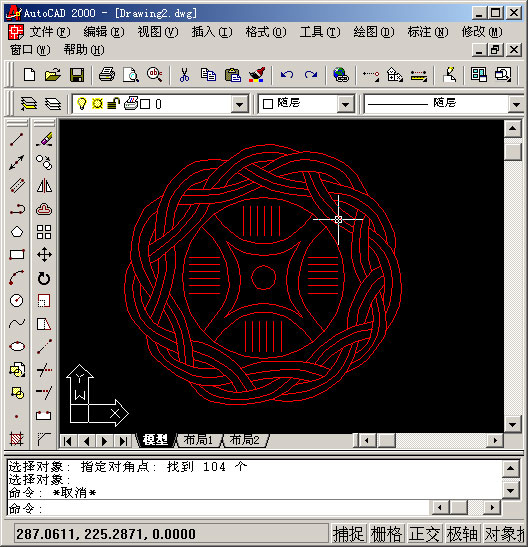
2、用superhatch,并根据实际情况选择填充参数


以下是我的命令行提示,除了比例需要自己输入,其他只要用鼠标点点就行
命令: superhatch
AutoCAD Express Tools Copyright ?1999 Autodesk, Inc.
正在初始化...
H1 指定插入点或 [比例(S)/X/Y/Z/旋转(R)/预览比例(PS)/PX/PY/PZ/预览旋转(PR)]:
输入 X 比例因子,指定对角点,或者 [角点(C)/XYZ] <1>: .1
输入 Y 比例因子或 <使用 X 比例因子>: .1
指定旋转角度 <0>:
命令:
接受该 BLOCK 的位置吗? [是(Y)/否(N)] <是>:
指定矩形的圆角半径 <0.0000>:
指定矩形的线宽 <0.0000>:
指定矩形的厚度 <0.0000>:
在 block 周围选择一个窗口来定义列和行的距离。
当前矩形模式: 宽度=0.8207
指定 block 的第一个角点 [范围(E)] <紫色矩形>:
当前矩形模式: 宽度=0.8207
指定矩形的圆角半径 <0.0000>:
指定矩形的线宽 <0.8207>:
指定矩形的厚度 <0.0000>:
正在选择用于边界检测的可见对象...完成。
说明:补充资料仅用于学习参考,请勿用于其它任何用途。