1) angle
[英]['æŋɡl] [美]['æŋgḷ]

角尺;角度;使转变角度;角铁
2) angle
[英]['æŋɡl] [美]['æŋgḷ]
角,角度;角钢;角铁
3) angular size
角度尺寸
1.
The angular size has little influence upon the angular error, the characteristic of which determines the size marking form.
分析了基本尺寸、尺寸公差及公差等级之间的关系;线性尺寸,随着基本尺寸的增大尺寸公差增大,或随着基本尺寸的增大而公差等级提高,这种关系决定了线性尺寸的标注形式;角度尺寸的大小对角度误差影响不大,这一特性决定了角度尺寸的标注形式。
4) uniform angle index
角尺度
1.
Characterizing forest spatial distribution pattern with the mean value of uniform angle index;
林木分布格局类型的角尺度均值分析方法
2.
Three structure parameters(mingling intensity,neighborhood comparison and uniform angle index) were employed to analyze the spatial structure characteristics of Houdendron biaristatum forest in Daming Mountain Nature Reserve,Guangxi.
利用混交度、大小比数和角尺度分析广西大明山云贵山茉莉林的空间结构。
3.
Last,the uniform angle index was used to analyse distribution pattern of the stand.
首先分析了北京八达岭林场元宝枫人工林林分的直径分布;然后利用Weibull分布进行直径拟合,并对拟合结果进行X2检验;最后用角尺度方法分析林木分布格局。
5) Neighborhood pattern
角尺度
1.
Three parameters,which are neighborhood pattern,mingling and neighborhood comparison,are used to describe spatial structure of the spruce-fir mixed stands of coniferous and broad-leaved trees in the over-logged forest of Changbai Mountains.
用角尺度、混交度和大小比数3个林分空间结构参数,分析了长白山过伐林区云冷杉针阔混交林的空间结构。
2.
In this paper,neighborhood pattern is considered to be a suitable one to analyze the distribution of tree positions,using its mean value and distribution,without having to measure distance and angle.
给出了应用角尺度调整林分空间结构的方法。
3.
Using the method of substitution of space for time and applying the spatial structure parameters mingling and neighborhood pattern to describe the spatial structure,the study of spatial structure is carried out.
选择受到不同程度干扰的阔叶红松林群落,以空间序列代替时间序列,应用空间结构参数混交度和角尺度描述处于不同发育阶段的阔叶红松林的空间结构,结果表明由先锋树种占相对优势阶段→伴生树种占相对优势阶段→稳定群落结构阶段,群落整体的混交度不断提高;由先锋树种占相对优势阶段→伴生树种占相对优势阶段,群落的结构变化大。
6) angular scale
角度标尺
补充资料:工程图标准尺寸及坐标尺寸
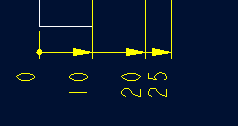
标准标注类型,是我们常用的标注类型。而坐标标注是便于数控加工采用的另一中标注形式。PRO/E可以将两种标注方式进行转换。
· 3.2 标准标注到坐标标注的转换
注意: 转化为坐标标注的尺寸必须是线性标注的,下列尺寸不能转化为坐标标注:
- 被显示成线性尺寸的直径
- 中心线尺寸
- 选择MODIFY DRAW > Dim Params > Dim Type > Ordinate Dim > Create Base.
- 选择作为参考基准线的尺寸
- 选择基准的引出线,该点为0点
- 选择 MOD DIM TYPE > Lin to Ord .
- 选择线性尺寸:注意:必须选择具有相同基准的尺寸
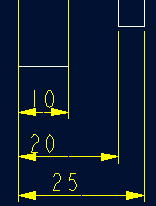 ========>>>>
1. 选择 DIM PARAMS > Diam Dim Type .
2.点击Ord to Lin 
3.选择尺寸即可
说明:补充资料仅用于学习参考,请勿用于其它任何用途。
参考词条