|
|
|
说明:双击或选中下面任意单词,将显示该词的音标、读音、翻译等;选中中文或多个词,将显示翻译。
|
|
|
1) new line operation

新线运营
2) new operators
新运营商
1.
This paper analyzes function features and pitfalls of currently commercialized MSTP equipments, recommendation is that for time being, metro transmission network based on MSTP is suitable for new operators, and it is in prospect that MSTP technology, in the future, it would play an important role in metro transmission networks.
本文分析了现阶段MSTP城域传送网技术的功能特点以及缺陷,提出MSTP城域传送网现阶段只适用于新运营商,并展望在将来城域网中MSTP将发挥重要作用。
3) operating innovation
运营创新
1.
In this paper, the author first analyzes the status and issues of telecom operating model based on the value chain, then puts forward the new telecom operating management model based on the value network, and finally discuss how the operators carry out the new operating model, from the views of value orientation?operating innovation and enterprise culture.
在此基础之上,提出基于价值网的电信运营管理模式;并从价值定位、运营创新及企业文化等方面对新运营管理模式的实现进行了深入探讨。
4) joint operation
共线运营
1.
Following the operation of Line 4,a joint operation on the shared ring rail is adopted on Line 3 and Line 4,features with simple track layout,9 joint stations,shorter headway and higher passenger volume,which has no precedent to go by even in the world.
上海轨道交通3、4号线采用共线运营方案,在共线车站多、车站配线简单、行车间隔小的条件下实现共线运营,在国内外轨道交通网都未见先例。
2.
Shanghai rail transit system adopts the transportation plan of Line 4 loop transportation by applying the joint operation of Line 3 and Line 4.
上海轨道交通系统3、4号线采用共线运营构成4号环线运输方案,在共线车站多、车站配线简单、行车间隔小的条件下,对延误调整、列车救援等运营调整过程中存在的困难进行分析。
3.
With a comprehensive definition of the joint operation in metropolitan rail tran sit,this paper makes a brief introduction about the operation mode in foreign ci ties.
给出了城市轨道交通共线运营的定义。
5) operating railway line
营运线
6) multi-line operation
多线运营
1.
Focusing on the urban rail transit system of Shenzhen, the paper points out the problems that occurred in AFC system in the transition period from single-line operation to multi-line operation.
通过对深圳市轨道交通现状的分析,指出自动售检票(AFC)系统由单线运营转向多线运营时所出现的问题。
补充资料:CAXA-V2线切割软件在DK7725e线切割机床上的应用
目前我国有大量的装有早期操作系统的数控设备,如何对其进行升级使这些设备重新焕发青春是摆在大家面前的一个很重要的问题。本文所介绍的正是这样的一个实例,文中所叙述的内容不仅对同类设备的改造具有现实意义,而且对其他类似设备的升级也有一定的借鉴作用。 苏州三光的DK7725e线切割机床的操作系统是基于DOS平台上的,而CAXA-V2线切割软件是在Windows 98平台上开发的应用软件。显然,我们无法直接将CAXA-V2线切割软件安装到DK7725e线切割机床的操作系统中。解决这一问题的关键是寻找二者的共同之处,那就是机床的后置处理和传输功能单元,即G代码程序。 一、CAXA-V2线切割软件方面的操作 1.进入绘图界面 在装有CAXA-V2线切割软件的计算机桌面上点击图标,进入该软件的绘图界面。 2.绘制零件图
在软件的绘图区域中绘制线切割加工零件图,如图1所示。
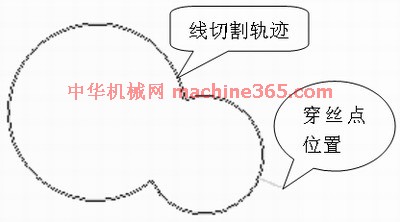
图1 线切割加工零件 3.生成加工轨迹 利用“轨迹生成”指令,生成线切割加工零件的加工轨迹,同时确定穿丝点位置和补偿量。 4.添加后置处理 由于CAXA-V2线切割软件并未提供DK7725e线切割机床的“后置处理和传输”,需要手工添加,具体操作过程如下: (1)点击CAXA-V2线切割软件的“后置处理和传输”图标,绘图区会弹出一个对话框。
(2)选中“增加机床”图标,在弹出的对话框中用键盘输入“BKDC”后,按确定键返回,如图2所示。
(3)在“后置处理和传输”的对话框中,按苏州三光的DK7725e线切割机床的“后置处理和传输”参数,手工输入相应的参数和指令,如图3所示。


图3 机床类型设置
(4)在“后置处理和传输”的对话框中点击“后置处理设置”后,相应地也会弹出一个对话框。该对话框中的参数要求也按苏州三光的DK7725e线切割机床的“后置处理设置”参数来设置,如图4所示。
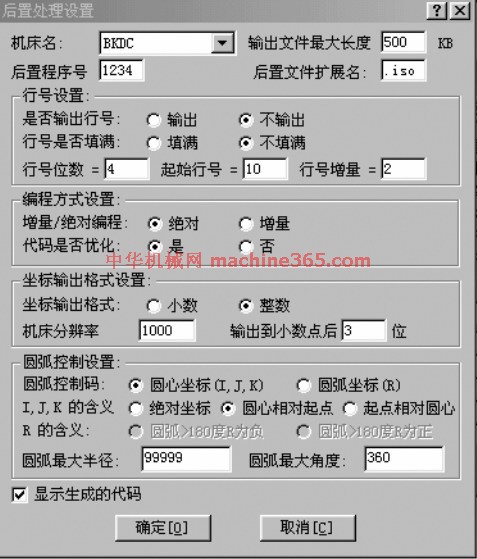
图4 后置处理设置 5.生成G代码 完成上述设置后,点击“代码生成”指令,选择“G代码生成”后,再选中线切割加工零件的加工轨迹,该轨迹图线将由绿色变为红色,最后点击鼠标右键,弹出记事本对话框显示相应的G代码加工程序,如图5所示。
说明:补充资料仅用于学习参考,请勿用于其它任何用途。
参考词条
|