1) 3DS model

3DS模型
1.
It does not produce ideal appearance of a 3DS model by simply averaging normals of the faces sharing a vertex to generate vertex normals.
渲染3DS模型时,简单地平均化共享顶点的各个面法向生成顶点法向,不能得到理想的渲染效果。
2) 3DS model file
3DS模型文件
1.
It also discussed the method of analyzing and abstracting data from 3DS model file, and introduced how to simulate using the model data in OpenGL environment.
介绍了用VC++开发微米长木纤维模压异型车用木制品三维仿真系统的开发过程,探讨对3DS模型文件进行分析提取的方法,提出在OpenGL环境中根据分析提取得到的模型数据对微米长纤维模压汽车构件进行模拟仿真的方法。
3) file format of 3ds models
3ds模型文件格式
4) 3ds Max model date
3ds Max模型数据
1.
This page ,manily researched two integration modes on ArcGis: 3ds Max model date and GIS Integration, which based on the introduction of the necessity of 3ds Max model date and GIS Integration.
本文在介绍3ds Max模型数据与GIS集成的必要性的基础上,着重研究了在ArcGIS平台下3ds Max与GIS的两种集成方式。
6) 3ds max software
3ds max软件
1.
The paper expounds how to build the 3 - D model for assemble component and parts of wagon dumper with Pro/ E software and how to transform STL files into 3ds max software to implement 3D animated simulation of tippler operation process.
利用Pro/E软件建立了翻车机的装配体及其零件的三维实体模型,然后转成STL文件导入3ds max软件,对翻车机的工作流程进行三维动态处理,实现了一种新型三车翻车机的动画仿真。
2.
In the computer virtual modeling and assembling of the arc inclined gear reducer, we can bring the technical advantages of AUTOCAD software and 3DS MAX software into full play by synthesis using them, so, we can complete the task of virtual modeling and assembling of the arc inclined gear reducer effectively.
在圆弧齿斜齿轮减速器的计算机拟实造型和拟实装配中,综合应用AUTOCAD和3DS MAX软件,可使各自的技术优势得到充分发挥,从而使减速器拟实造型和拟实装配工作得以高效、优质完成。
补充资料:AutoCad 教你绘制三爪卡盘模型,借用四视图来建模型
小弟写教程纯粹表达的是建模思路,供初学者参考.任何物体的建摸都需要思路,只有思路多,模型也就水到渠成.ok废话就不说了.建议使用1024X768分辨率
开始
先看下最终效果

第一步,如图所示将窗口分为四个视图

第二步,依次选择每个窗口,在分别输入各自己的视图

第三步,建立ucs重新建立世界坐标体系,捕捉三点来确定各自的ucs如图
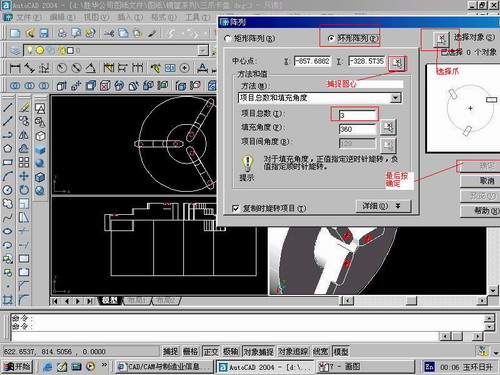
第四步,初步大致建立基本模型.可以在主视图建立两个不同的圆,在用ext拉升,在用差集运算.如图:
第五步:关键一步,在此的我思路是.先画出卡爪的基本投影,在把他进行面域,在进行拉升高度分别是10,20,30曾t形状.如图:
第六步:画出螺栓的初步形状.如图
第七步:利用ext拉升圆,在拉升内六边形.注意拉升六边行时方向与拉升圆的方向是相反的.
之后在利用差集运算
第八步:将所得内螺栓模型分别复制到卡爪上,在利用三个视图调到与卡爪的中心对称.效果如图红色的是螺栓,最后是差集
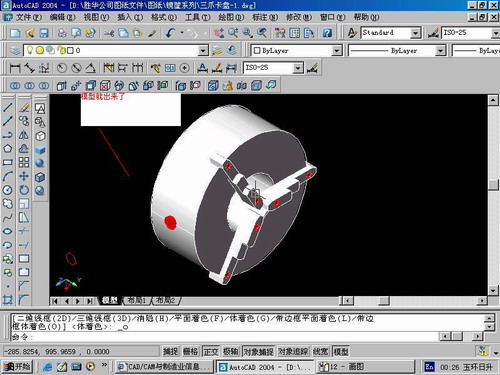
第九步:阵列
第10步.模型就完成了
来一张利用矢量处理的图片

说明:补充资料仅用于学习参考,请勿用于其它任何用途。
参考词条