1) fashionable usage

时尚用法
1.
Great importance should be attached to the fashionable usage of old words, characterized by their changes in lexical and grammatical meaning, whose formation and development are based on the complicated social and cultural background and closely related with the psychology in language communication and the language itself.
固有词语的时尚用法是语言发展变化中一种值得注意的现象 ,表现为固有词语语汇意义和语法意义的变化 ,其形成和发展有着复杂的社会文化背景 ,并与社会群体的言语交际心理和语言自身的因素相关联。
2) effect of fashion
时尚效用
3) fashion
[英]['fæʃn] [美]['fæʃən]
时尚
1.
Nostalgic Minimalism and Fashionable Minimalism——A discussion of chair in Ming furniture and Nordic furniture;
怀旧的简约与时尚的简约——中国明式家具与北欧家具的椅子设计辨析
2.
Study on fashion designs of woolen fabrics;
粗纺产品设计时尚化探讨
3.
Product Design Based on Fashionable Consumption Culture;
基于时尚消费文化的产品设计
4) vogue
[英][vəʊɡ] [美][vog]
时尚
1.
It analyzes the directed function of vogue magazine to fashion, and the popular book, the popular movies and television drama, the dress of the stars, pop music, foreign culture and personal influence that appreciates beauty.
具体分析时尚杂志对服饰流行的导向作用,以及畅销书籍、热播影视作品、明星穿着打扮、流行音乐、外来文化及个人审美对服饰流行的影响。
2.
Such spatial transformation of costume has created the new vogue figur
服装从直线结构宽松造型发展为曲线结构立体造型,继而形成直线结构和曲线结构两种造型的并列发展,这种服装的空间变革创造了新的时尚形象。
5) fad
[英][fæd] [美][fæd]
时尚
1.
Popularity and fad attract the attention of the marketer in the age of market economy.
流行、时尚是市场经济时代最受营销者关注的问题,流行和时尚的周期运转越迅速经济发展会越快速,因此研究流行与时尚的相关问题就越受关注。
2.
Personal tailor may attract high earning people and faddish people.
面对不断细分的市场,羊绒企业可以通过实施羊绒制品的个性化定制吸引中高收入群体和时尚人群,通过提供产品定制服务提高产品的附加值。
3.
At present,the short message has become the most important and popular communicative fad to today s people.
时尚短信是指复制频率高,流行速度快,传播面积广,影响力度大的文字短信,它已成为现代人最为重要和流行的一种交际时尚。
6) highly praised law
尚法
1.
The belief of highly valued power and highly praised law has been influential tradition for thousands years.
我国古代思想家认为,在各种政治因素中,“势”处于第一位,国家权力历来为君主所独断,因此要“贵势”;“法”乃君主治国之道,犹如公正的“尺寸”,是衡量的标准,不偏不倚,一视同仁,因此又“尚法”。
补充资料:AutoCAD 超级填充用法
在使用超级填充前首先要确认你的ACAD已经安装了快捷工具
1、画好填充内容,做成块,本例的块名是“h1”
1、画好填充内容,做成块,本例的块名是“h1”
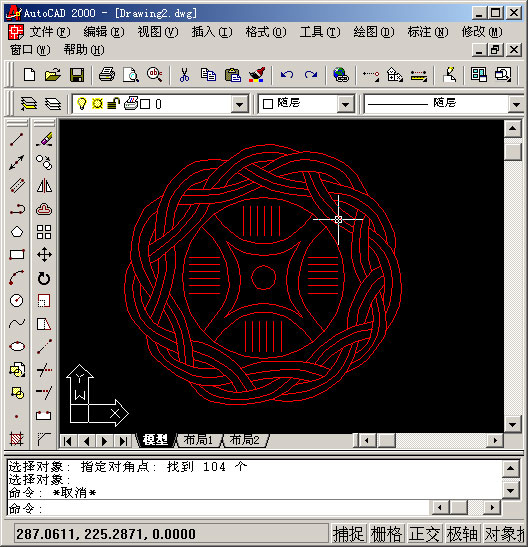
2、用superhatch,并根据实际情况选择填充参数


以下是我的命令行提示,除了比例需要自己输入,其他只要用鼠标点点就行
命令: superhatch
AutoCAD Express Tools Copyright ?1999 Autodesk, Inc.
正在初始化...
H1 指定插入点或 [比例(S)/X/Y/Z/旋转(R)/预览比例(PS)/PX/PY/PZ/预览旋转(PR)]:
输入 X 比例因子,指定对角点,或者 [角点(C)/XYZ] <1>: .1
输入 Y 比例因子或 <使用 X 比例因子>: .1
指定旋转角度 <0>:
命令:
接受该 BLOCK 的位置吗? [是(Y)/否(N)] <是>:
指定矩形的圆角半径 <0.0000>:
指定矩形的线宽 <0.0000>:
指定矩形的厚度 <0.0000>:
在 block 周围选择一个窗口来定义列和行的距离。
当前矩形模式: 宽度=0.8207
指定 block 的第一个角点 [范围(E)] <紫色矩形>:
当前矩形模式: 宽度=0.8207
指定矩形的圆角半径 <0.0000>:
指定矩形的线宽 <0.8207>:
指定矩形的厚度 <0.0000>:
正在选择用于边界检测的可见对象...完成。
说明:补充资料仅用于学习参考,请勿用于其它任何用途。
参考词条