1) VBScript script

VBScript脚本
2) VBScript language
VBScript脚本语言
1.
Through the comparison and analysis of protecting the code by ActiveX DLL or ASP,this paper puts forward the method of protecting the code by means of the ActiveX DLL to package the important code and business logic instead of the VBScript language.
通过对ActiveX DLL和ASP在程序开发过程中源代码保护功能的比较分析,提出了采用VB编写的ActiveX DLL替代简单的纯VBScript脚本语言来实现核心代码和商业逻辑的封装,从而实现ASP源代码保护的方法。
3) script
[英][skrɪpt] [美][skrɪpt]
脚本
1.
The compilation of shooting script and its application in educational films;
分镜头脚本的编写及在编制教学片中的应用
2.
PScript: An efficient extensible scripting language running on the J2ME platform;
PScript:基于J2ME平台的高效可扩展脚本语言
3.
The Application of Scripting Technology in Game Engine;
脚本技术在游戏引擎中的应用
4) scripts
[英][skript] [美][skrɪpt]
脚本
1.
Research on SAP-based Automation Test Scripts Technology;
基于SAP项目的自动化测试脚本开发技术研究
2.
Discussion on Writing Sub-lens Scripts in Health Science Popularization Film
卫生科普片分镜头脚本撰写的探讨
5) scenario
[英][sə'nɑ:riəʊ] [美][sə'nærɪo]
脚本
1.
This paper introduces a method to fast develop the word_type coureware on the basis of the control signal of scenario.
介绍一套基于脚本控制符的快速开发文字型课件的方法。
2.
Sanford & Garrod believe that people will construct a mental model and activate a scenario to interpret text when they read.
Sanford & Garrod的脚本理论认为 ,人们在交际中会在大脑中建构一个心理模型 ,激活用于理解语篇的认知脚本。
3.
Sanford & Garrod believe that interlocutors will construct a mental model and activate a scenario to interpret each other during communication.
Sanford&Garrod认为 ,在交际过程中 ,人们会在大脑中构建一个心理模型 ,激活用于理解话语的脚本 ,话语能否被理解取决于脚本是否适合于当前话语。
6) an acting version of a play
脚本,剧本
补充资料:AutoCAD脚本文件的创建和使用
1 脚本文件简介
脚本文件类似于DOS操作系统中的批处理文件,它可以将不同的AutoCAD命令组合起来,并按确定的顺序自动连续地执行。脚本文件是文本文件,扩展名为“.SCR”,用户可使用任一文本编辑器来创建脚本文件。
因为脚本文件可使一些命令序列自动执行,所以常用来产生、编辑或观看图形,如幻灯放映、初始的图形设置等。但脚本文件不能使用对话框或菜单,当从脚本文件中发出打开对话框命令时,AutoCAD运行该命令的命令栏含义而不是打开对话框。
用户可以通过命令行的开关设置,使AutoCAD在启动时自动调用脚本。此外,用户也可以在AutoCAD中运行脚本,其调用方式为:
菜单:【Tools(工具)】→【Run Script…(运行脚本)】
命令行:script(或别名scr)
注意 AutoCAD 的“undo”命令将每个脚本当作一个组,可以用单个“undo”命令放弃一组脚本的操作。
说明 “script”命令可透明地使用。
2 实例1 使用脚本文件绘制并显示图形
Step 1 创建脚本文件“exam_draw.scr”
(1) 使用Windows附件中的“记事本”程序创建一个新文件。
(2) 在该文件中添加如下内容,如图1所示。
脚本文件类似于DOS操作系统中的批处理文件,它可以将不同的AutoCAD命令组合起来,并按确定的顺序自动连续地执行。脚本文件是文本文件,扩展名为“.SCR”,用户可使用任一文本编辑器来创建脚本文件。
因为脚本文件可使一些命令序列自动执行,所以常用来产生、编辑或观看图形,如幻灯放映、初始的图形设置等。但脚本文件不能使用对话框或菜单,当从脚本文件中发出打开对话框命令时,AutoCAD运行该命令的命令栏含义而不是打开对话框。
用户可以通过命令行的开关设置,使AutoCAD在启动时自动调用脚本。此外,用户也可以在AutoCAD中运行脚本,其调用方式为:
菜单:【Tools(工具)】→【Run Script…(运行脚本)】
命令行:script(或别名scr)
注意 AutoCAD 的“undo”命令将每个脚本当作一个组,可以用单个“undo”命令放弃一组脚本的操作。
说明 “script”命令可透明地使用。
2 实例1 使用脚本文件绘制并显示图形
Step 1 创建脚本文件“exam_draw.scr”
(1) 使用Windows附件中的“记事本”程序创建一个新文件。
(2) 在该文件中添加如下内容,如图1所示。
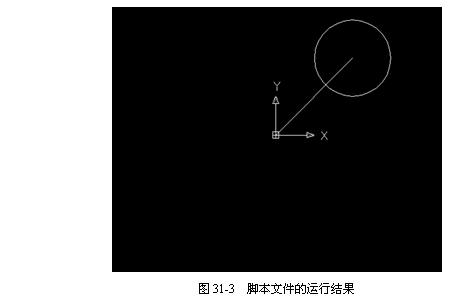
注意 其中调用“exam_view.scr”文件的路径应根据实际情况而定。
(3) 以“exam_draw.scr”为名保存该文件。
Step 2 创建脚本文件“exam_view.scr”
(1) 使用Windows附件中的“记事本”程序创建一个新文件。
(2) 在该文件中添加如下内容,如图2所示。
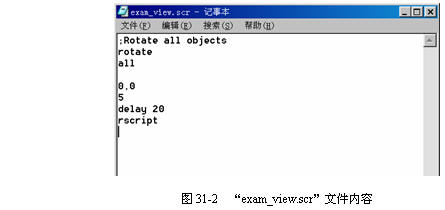
(3) 以“exam_view.scr”为名保存该文件。
说明:补充资料仅用于学习参考,请勿用于其它任何用途。
参考词条