1) spring brake
弹簧闸
1.
The construction of the direct-push spring brake with paranel shift of mine winders have been analysed and its technological parameters have been calculated and tested.
提出了矿用提升机直推平移式弹簧闸。
2) spring
弹簧
1.
Application of static painting on the spring of gas valve;
静电喷涂在液化气阀门弹簧上的应用
3) springs
弹簧
1.
Reliability-based robust design of mechanical components with arbitrary distribution parameters, Part 3: springs;
任意分布参数的机械零件的可靠性稳健设计(三):弹簧
2.
s:The investigation of the stress relaxation of springs is significant for reliable application.
弹簧的应力松弛研究对弹簧的可靠应用具有重要意义,依据温度对弹簧的应力松弛影响比较明显的基本原理,本文采用温度加速试验方法,对65Mn螺旋弹簧的贮存寿命进行了试验研究。
3.
Using the theoretical method of reliability-based robust optimization design (in part 1), several springs in automobiles, such as torsion bar, coil spring and multi-leaf spring are computed and the emulation results are analyzed.
应用汽车零部件可靠性稳健优化设计的理论方法 ,对汽车典型弹簧系零部件 ,如扭杆弹簧、螺旋弹簧和钢板弹簧进行了可靠性稳健优化设计 ,给出了计算仿真分析结果 ,为工程实际的汽车零部件的可靠性稳健优化设计提供了理论依
4) rubber spring
橡胶弹簧
1.
Rubber spring s finite element simulation modeling and simulation based on ANSYS;
采用ANSYS的橡胶弹簧的有限元建模与仿真
2.
Horizontal directional rigidity and stability analysis of system of paralleled high coils in series with rubber spring at their one end;
并联高圆簧一端串联橡胶弹簧系统水平方向刚度及稳定性分析
3.
Lateral stiffness analysis of parallel flexicoil spring in series with rubber spring on both ends;
并联高挠圆簧两端串联橡胶弹簧系统水平方向刚度分析
5) spring steel
弹簧钢
1.
Stress analysis of decarburized surface of spring steel 60Si2Mn;
弹簧钢60Si2Mn脱碳表面的应力分析
2.
Effect of Heat Treatment Process on Structure and Properties of Spring Steel;
热处理工艺对弹簧钢组织和性能的影响
3.
Fracture analysis of the tensile specimens from 60Si2CrVA spring steel;
60Si2CrVA弹簧钢拉伸试样断口分析
6) spring of top apron cradle
上销弹簧
参考词条
压紧弹簧
弹簧法
60Si2CrVAT弹簧钢
弹簧钢40CrMnSiMoV
纳米弹簧
弹簧钢丝
悬架弹簧
弹簧夹头
空气弹簧
氮气弹簧
电磁弹簧
异形弹簧
自旋弹簧
弹簧钢52CrMnBA
金融复杂性
DMSP/O LS
补充资料:solidworks仿真弹簧+动画制作教程
鉴于很多朋友对这个问题一直解决不了,把教程做出来,希望望大家能够很好学习。通过本例学习,关联设计的思路和动画仿真的制作。
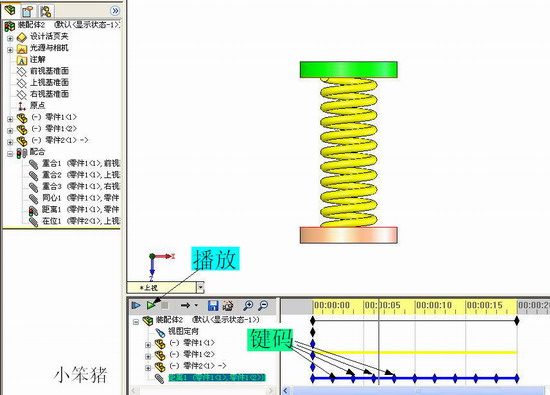
最终的效果:

首先建立基本零件,具体结构可以自己设定,本例采用圆柱体作为基本结构。
选择前视基准面,建立圆形草图,尺寸自己定,拉伸草图,选项如图:
由该零件生成装配体,将零件设定为浮动状态,添加配合,通过配合零件基准面和装配体基准面,固定零件1的位置。如图:
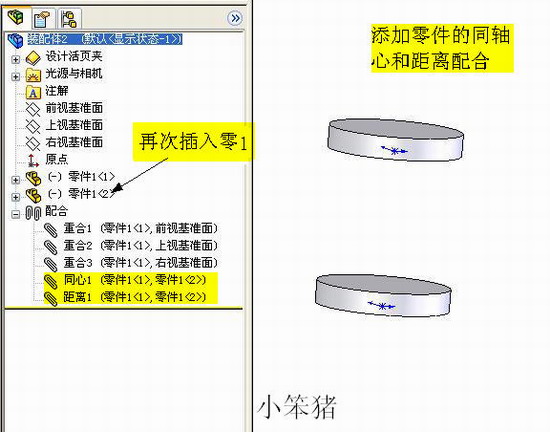
再次插入零件1,,添加同轴心配合,以及面的距离配合。如图:
插入——零件——新零件,单击装配体前视基准面定位新零件,如图:
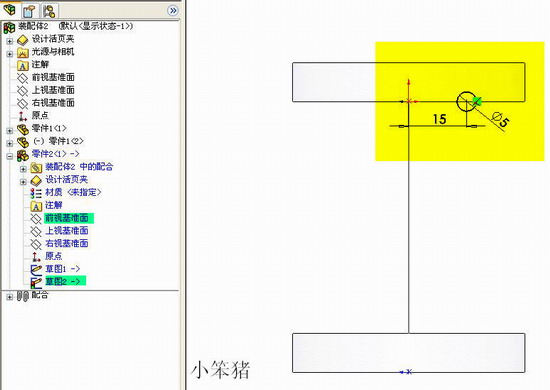
在新零件编辑界面下,选择前视基准面,绘制直线,直线的两端与一直零件边线重合。如图:
选择前视基准面,绘制草图2,。如图:
插入——特征——扫描,选项如图:
选择前视基准面,绘制矩形区域,矩形边线与已知零件边线重合,切除拉伸,选项如图:
退回到装配体编辑状态,打开动画插件,如图:

为便于观察,编辑零件颜色,通过添加零件键码位置(本例之添加配合中距离的键码)。播放动画即可,动画编辑如图:
最后通过视频录制或者gif录制来查看最后效果,如图:
说明:补充资料仅用于学习参考,请勿用于其它任何用途。