1) leap model

LEAP模型
1.
In order to investigate the effect of low carbon development on energy supply and environment impact, this study, taking Shanghai as a case study, forecasts energy demand, local air pollutant and CO2 emissions in BAU and low carbon development scenarios by using LEAP model.
为探索低碳发展对能源环境的影响,本研究以上海为例,利用LEAP模型对“零方案”情景(BAU)和低碳发展情景下的能源消费及大气污染物排放量进行了预测。
2) leap-frog difference schemequalitative analysis
leap-frog型差分格式
3) DK-Leap algorithm
DK-Leap算法
1.
The DK-Leap algorithm for simulating chemically reacting system with delays;
模拟时滞化学反应系统中的DK-Leap算法
4) leap condition
Leap条件
1.
Presented here is the delay K-Leap(DK-Leap) method,an accelerated method for simulating chemically reacting systems with delays,in which the total number of reactions occurring during a leap to be a number K calculated from the leap condition,and timeτis randomly determined according to its obtained prob.
DK-Leap算法首先确定满足Leap条件的总反应次数K,然后利用得到τ的概率密度函数随机确定时间区间[t,t+τ)。
2.
Presented here is an L-leap method for accelerating stochastic simulation of well stirred chemically reacting systems,in which the number of reactions occurring of a reaction channel with the largest propensity function is calculated from the leap condition and the numbers of reactions occurring of the other reaction channels are generated by using binomial random variables during a leap.
提出了随机模拟化学反应系统的加速L-leap算法,该算法根据leap条件确定具有最大倾向函数的反应通道的反应次数,并利用二项分布随机数生成其它反应通道在当前leap时间区间内的反应次数。
5) L-leap algorithm
L-leap算法
6) Leap-frog scheme
Leap-frog格式
1.
Improvement of Leap-frog scheme;
Leap-frog格式的改进
补充资料:AutoCad 教你绘制三爪卡盘模型,借用四视图来建模型
小弟写教程纯粹表达的是建模思路,供初学者参考.任何物体的建摸都需要思路,只有思路多,模型也就水到渠成.ok废话就不说了.建议使用1024X768分辨率
开始
先看下最终效果

第一步,如图所示将窗口分为四个视图

第二步,依次选择每个窗口,在分别输入各自己的视图

第三步,建立ucs重新建立世界坐标体系,捕捉三点来确定各自的ucs如图
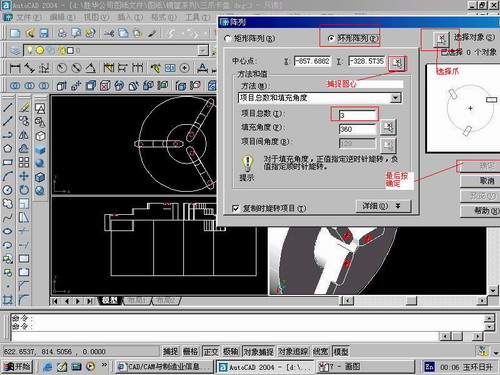
第四步,初步大致建立基本模型.可以在主视图建立两个不同的圆,在用ext拉升,在用差集运算.如图:
第五步:关键一步,在此的我思路是.先画出卡爪的基本投影,在把他进行面域,在进行拉升高度分别是10,20,30曾t形状.如图:
第六步:画出螺栓的初步形状.如图
第七步:利用ext拉升圆,在拉升内六边形.注意拉升六边行时方向与拉升圆的方向是相反的.
之后在利用差集运算
第八步:将所得内螺栓模型分别复制到卡爪上,在利用三个视图调到与卡爪的中心对称.效果如图红色的是螺栓,最后是差集
第九步:阵列
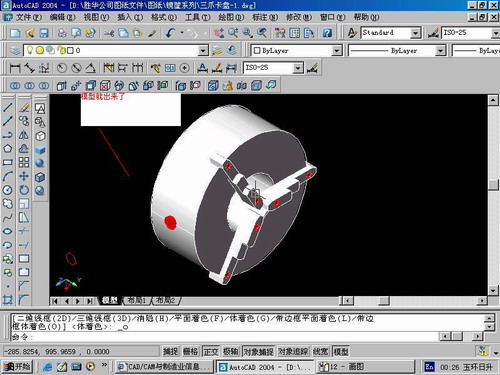
第10步.模型就完成了
来一张利用矢量处理的图片

说明:补充资料仅用于学习参考,请勿用于其它任何用途。
参考词条